
Persona & Rules
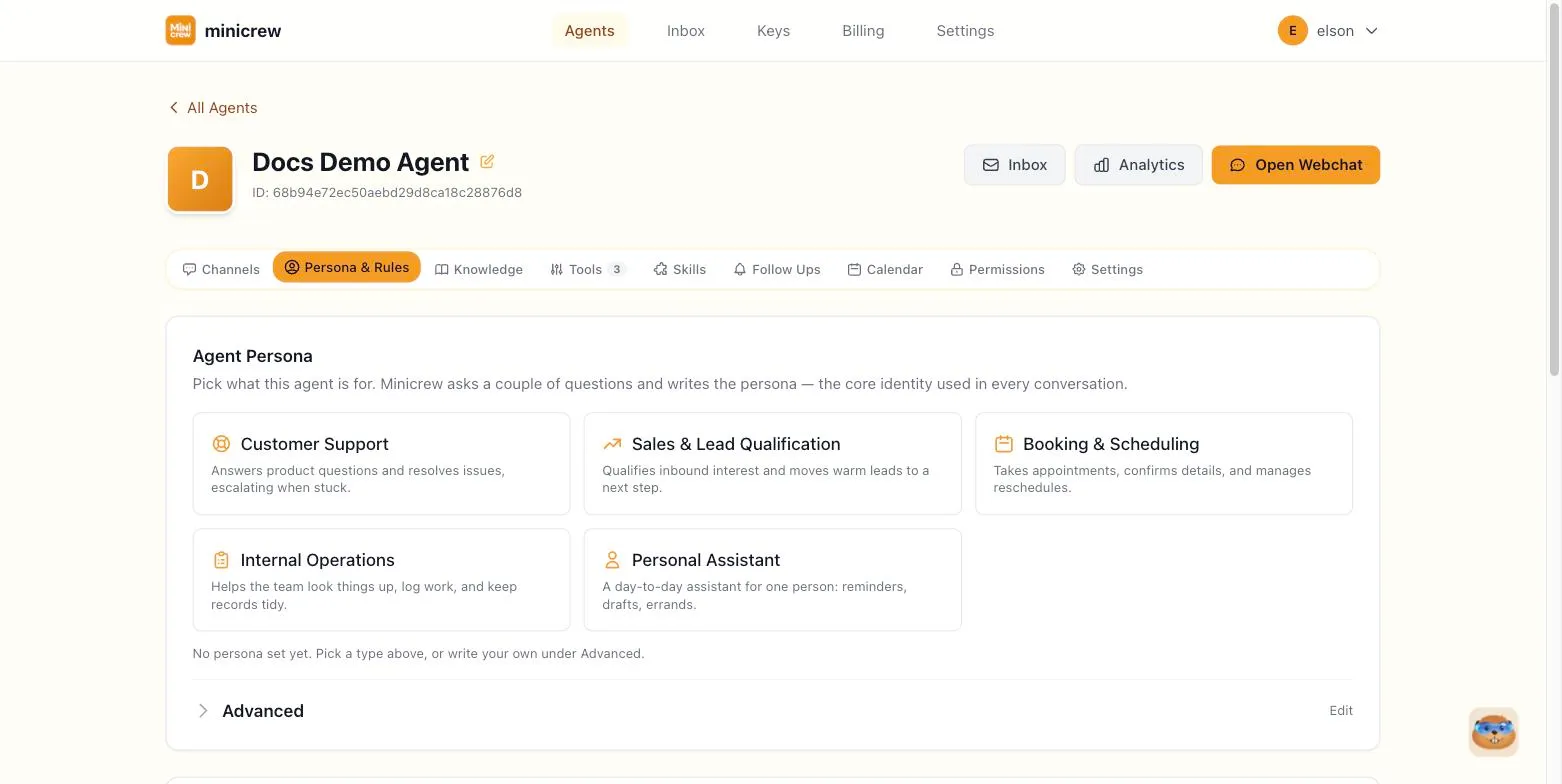
The Persona & Rules tab defines your agent’s identity: who it is, how it talks, and what it must never do. Of everything on the Configure page, this is the single biggest lever for how your agent “feels” to the people talking to it.
Picking a persona type
Section titled “Picking a persona type”At the top of the tab, pick what this agent is for:
- Customer Support
- Sales & Lead Qualification
- Booking & Scheduling
- Internal Operations
- Personal Assistant
Clicking a type opens a short guided wizard that writes the persona for you.
A business agent talking to customers usually fits Customer Support, Sales & Lead Qualification, or Booking & Scheduling, whichever matches the job. Internal Operations is for a team-facing agent that helps your own staff instead of outside customers, logging work, looking things up, keeping records tidy. Personal Assistant is the odd one out: it’s built for a single person’s day-to-day (reminders, drafts, errands), not for representing a business at all, so its Rules and escalation conditions tend to be much lighter than a customer-facing agent’s.
The guided wizard
Section titled “The guided wizard”- Who is this agent serving? Choose A business (customers, clients, the public) or An individual (one person, day to day).
- Details — depending on your choice, fill in a business name or the person’s name, what the business does or what the agent should help with, and anything else the agent must know: hours, language preferences, quirks. A tone of voice picker is optional; leave it unpicked and the template’s own natural voice is used.
- Generate & review. Minicrew writes the persona text. Click Regenerate if it’s not quite right, or Use this persona to apply it.
After applying, the written persona appears under Advanced so you can fine-tune it immediately.
Advanced: editing the persona text directly
Section titled “Advanced: editing the persona text directly”Expand Advanced on the Agent Persona card to see and edit the exact text that gets injected as the agent’s identity in every conversation. You can write this from scratch instead of using the wizard, or tweak whatever the wizard generated. There’s also an Optimize button that can help tighten up your wording.
The Rules card is for absolute, non-negotiable constraints — things the agent must always follow, distinct from persona (which is about identity and tone). Write one rule per line, for example:
- Never discuss competitor products- Always respond in English- Do not share pricing without confirmation- Escalate to human when askedRules also has an Optimize button to help tighten the wording, and a running character counter (10,000 character limit).
Success and escalation conditions
Section titled “Success and escalation conditions”Below Rules, a Success & Escalation card lets you define:
- Success conditions — plain-language descriptions of what counts as a successfully resolved conversation (e.g. “customer confirmed their booking”).
- Escalation rules — conditions under which the conversation should be flagged for a human (e.g. “customer asks for a refund”).
These feed directly into the Follow Ups tab. A toggle there, Stop follow-ups after success/escalation, stops automatic follow-up messages once a conversation is marked Success or Escalated, until the customer sends a new message.
Writing prompts that actually work
Section titled “Writing prompts that actually work”The wizard gets you a solid first draft, but the text you write in Advanced, Rules, and Success & Escalation is a real prompt to a language model. The same principles that make any AI instruction reliable apply here. Some rules of thumb, roughly in order of impact:
1. Be specific, not vague
Section titled “1. Be specific, not vague”Vague instructions get vague, inconsistent behavior. Compare:
- ❌ “Be helpful and professional.”
- ✅ “Answer in 2–3 sentences unless the customer asks for detail. Confirm the order number before discussing any refund. Never guess a price — look it up or say you’ll check.”
The second version tells the agent exactly what to do in exactly which situations. If you catch yourself writing an adjective like “friendly,” “concise,” or “thorough,” ask what that adjective actually means in a real conversation. Write that instead.
2. Show, don’t just tell: give examples
Section titled “2. Show, don’t just tell: give examples”If there’s a tricky judgment call your agent has to make repeatedly, a short example beats several sentences of description:
When a customer asks "is this available", check the inventory tool first.Example: Customer: "Do you have the blue one in stock?" Agent: [checks inventory] "Yes — 3 left in blue. Want me to hold one?"Don't answer from memory or guess.3. Structure beats one long paragraph
Section titled “3. Structure beats one long paragraph”Rules and success/escalation conditions get followed more reliably as short, separate lines than as one dense paragraph. The agent, and future-you editing this in six months, can scan a list far faster than untangling run-on prose. Use one instruction per line, and group related rules together.
4. Define “done” and “hand this off” explicitly
Section titled “4. Define “done” and “hand this off” explicitly”Two common failure modes: an agent that never realizes a task is finished, and one that never realizes it’s out of its depth. Both get fixed the same way. Write down the actual condition, not a feeling.
- ❌ “Escalate difficult conversations.”
- ✅ “Escalate when: the customer explicitly asks for a human, the customer is asking for a refund over $200, or the same question has been asked 3 times without resolution.”
5. Put the highest-stakes rule first
Section titled “5. Put the highest-stakes rule first”Instructions near the top of a long persona or rules block tend to get followed more consistently than ones buried at the bottom, especially once a conversation runs long. If there’s one rule you absolutely cannot afford the agent to break, a compliance requirement, say, or a “never quote a price without X” rule, put it at the top of Rules, not the middle.
6. Iterate against real conversations
Section titled “6. Iterate against real conversations”Write a first version, test it in Chat, and adjust based on what actually goes wrong, not what you imagine might go wrong. If the agent keeps making the same mistake, that’s almost always a sign the instruction needs to be more specific (see #1), not longer.