
Settings
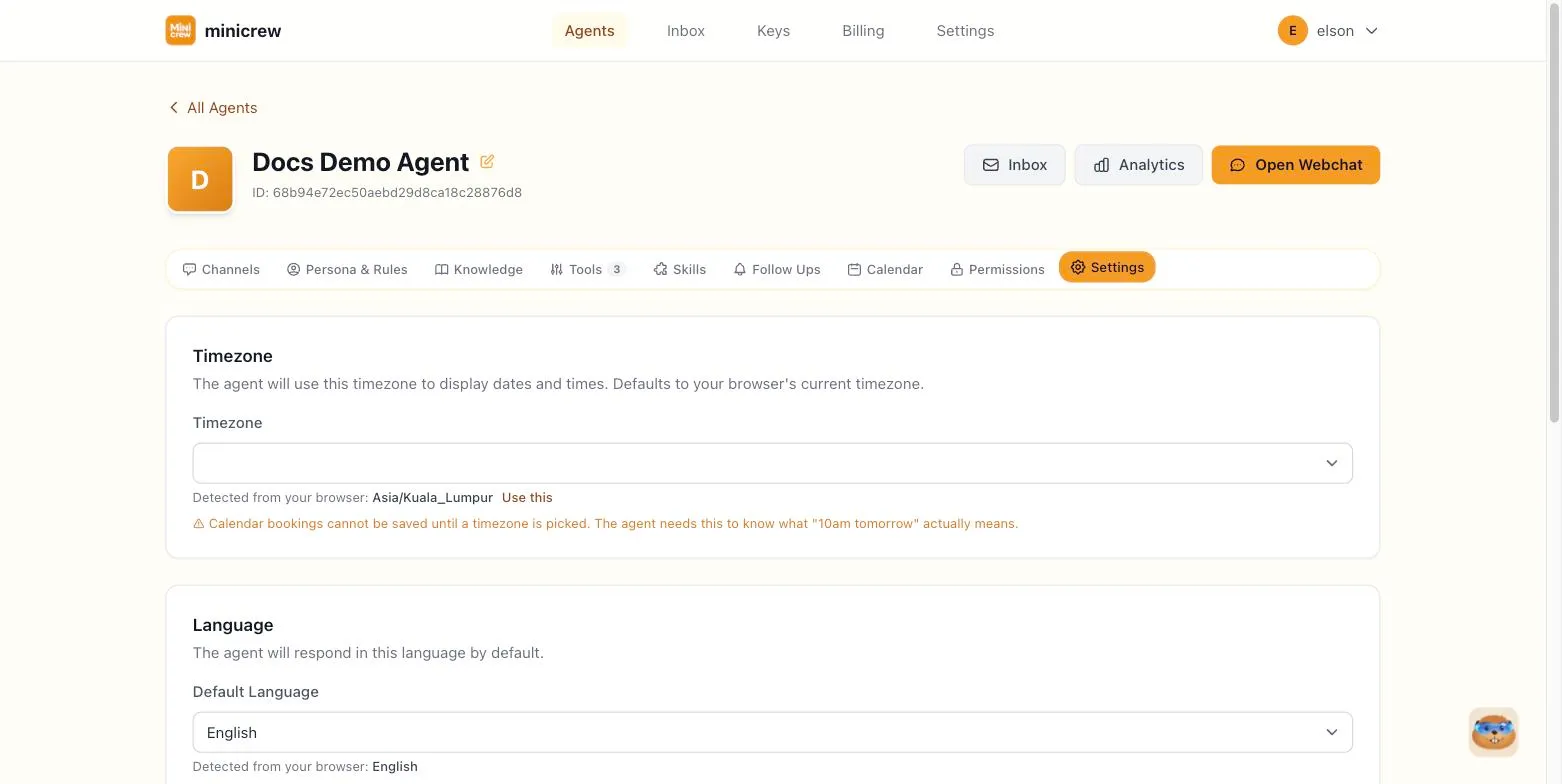
The Settings tab holds a handful of per-agent behavior settings, plus the option to permanently delete the agent. These are distinct from your overall workspace/billing settings, which live elsewhere in Minicrew.
Timezone
Section titled “Timezone”The timezone the agent uses to understand and display dates and times, which matters most for anything booking-related. Minicrew shows your browser’s detected timezone as a hint with a Use this shortcut, but it won’t silently apply it for you. You need to explicitly pick one so it actually gets saved.
Language
Section titled “Language”The language the agent replies in by default. Minicrew shows your browser’s detected language as a hint, and offers a long list of languages to choose from directly.
Silent Task Completion
Section titled “Silent Task Completion”When a background task finishes (a delegated skill, an MCP server call, an async research task), the agent normally describes what it did. Turning this on makes it reply with a short, generic acknowledgement instead, like “All Done!”, rather than a play-by-play. That’s the right call for customer-facing bots, where a technical narration would just confuse people. Screenshots or files the person explicitly asked for still get sent either way; only the descriptive text is suppressed.
Keep going after sending a saved answer
Section titled “Keep going after sending a saved answer”Only shown once the Knowledge base is turned on. Normally, after the agent sends a saved FAQ answer (a price list, brochure, or photos) it stops right there. Turning this on makes it continue the conversation in the same breath, for example following photos with “Would you like to book your first appointment?” It’s best for sales and booking flows. Leave it off if you’d rather the agent simply answer and wait.
Know the customer’s phone number
Section titled “Know the customer’s phone number”Only shown once the API channel is enabled. When someone messages this agent over WhatsApp or SMS through the Messaging API, this lets the agent automatically know their phone number without asking the customer to share it, useful for looking up an order, sending a one-time code, or just greeting them by context. It works for one-to-one chats only; group chats are ignored.
What matters for which agent
Section titled “What matters for which agent”Silent Task Completion is a business-agent setting almost by definition: customers don’t want to read a play-by-play of what the agent did behind the scenes, they just want the answer. A personal or internal assistant often works better with it off, since seeing exactly what the agent did (which file it read, which record it updated) is useful when it’s you or your own team on the other end. Keep going after sending a saved answer is squarely for sales and booking flows; a personal assistant rarely has a next-step to push toward, so it’s usually left off.
Agent Mode: Standard vs. Performance
Section titled “Agent Mode: Standard vs. Performance”Near the bottom of the tab, above Danger Zone, an Agent Mode dropdown lets you switch an agent between two engines: Standard (the default) and Performance (currently in beta).
Standard mode
Section titled “Standard mode”This is what every agent runs on today. The agent replies conversationally, turn by turn, and hands off anything that takes real work (looking something up, running a skill, calling an integration) as a background task while it keeps the conversation going. It’s the proven, battle-tested option, and it’s what you should stick with for everyday support and sales conversations.
Performance mode (beta)
Section titled “Performance mode (beta)”Performance mode is built for requests that need several steps done correctly before anything counts as “finished,” the kind of job where a normal chatbot might quietly stop halfway through, or declare victory before actually checking its own work.
Here’s what it does differently, in plain terms:
- It writes down a to-do list before starting. For a multi-step request, the agent breaks the job into a visible checklist right there in the chat, instead of just working from memory. You can watch it tick items off one by one as it goes.
- It isn’t allowed to say “done” on its own say-so. In Standard mode, the agent decides for itself when a job is finished, that’s just how it talks. In Performance mode, the platform itself checks the checklist: if any item is still open, the agent is blocked from wrapping up and is told exactly what’s left. “Done” stops being an opinion and becomes something the system actually verifies.
- A second, independent check reviews the finished work. Before the agent replies with a final answer, a separate review pass looks at everything it did and asks: does this actually satisfy what was asked? If something looks missing or inconsistent, the agent gets sent back to fix it before the customer ever sees a reply.
- Success and escalation are judged against your own rules, not guessed. If you’ve set Success conditions, Performance mode checks the completed work against those specific conditions, rather than assuming that “finished the tasks” automatically means “the customer got what they needed.” The same discipline applies to escalation: instead of the agent just trailing off or saying something vague, it hands off with a clear, structured reason, what it tried, and what it still needs from a human.
- If something interrupts the agent partway through, it picks up where it left off. A dropped connection or a long pause doesn’t lose the job. Performance mode remembers exactly which checklist items were already done and resumes from there instead of starting over or going silent.
When to use which
Section titled “When to use which”Performance mode is worth trying for agents doing genuinely multi-step work: booking flows with several dependent steps, research that pulls from more than one source, anything where a half-finished job would actually cause a problem. For a simple FAQ bot or a quick-reply support agent, Standard mode is simpler, faster, and just as reliable, there’s no multi-step job for Performance mode’s extra checking to add value to.
Danger Zone: deleting the agent
Section titled “Danger Zone: deleting the agent”At the bottom of the tab, Delete Agent permanently removes this agent and all of its configuration, channel connections, and chat history. This cannot be undone; see Creating an Agent for the full confirmation flow. If you just want to pause an agent temporarily, turn off its channels on the Channels tab instead of deleting it.