
Tools
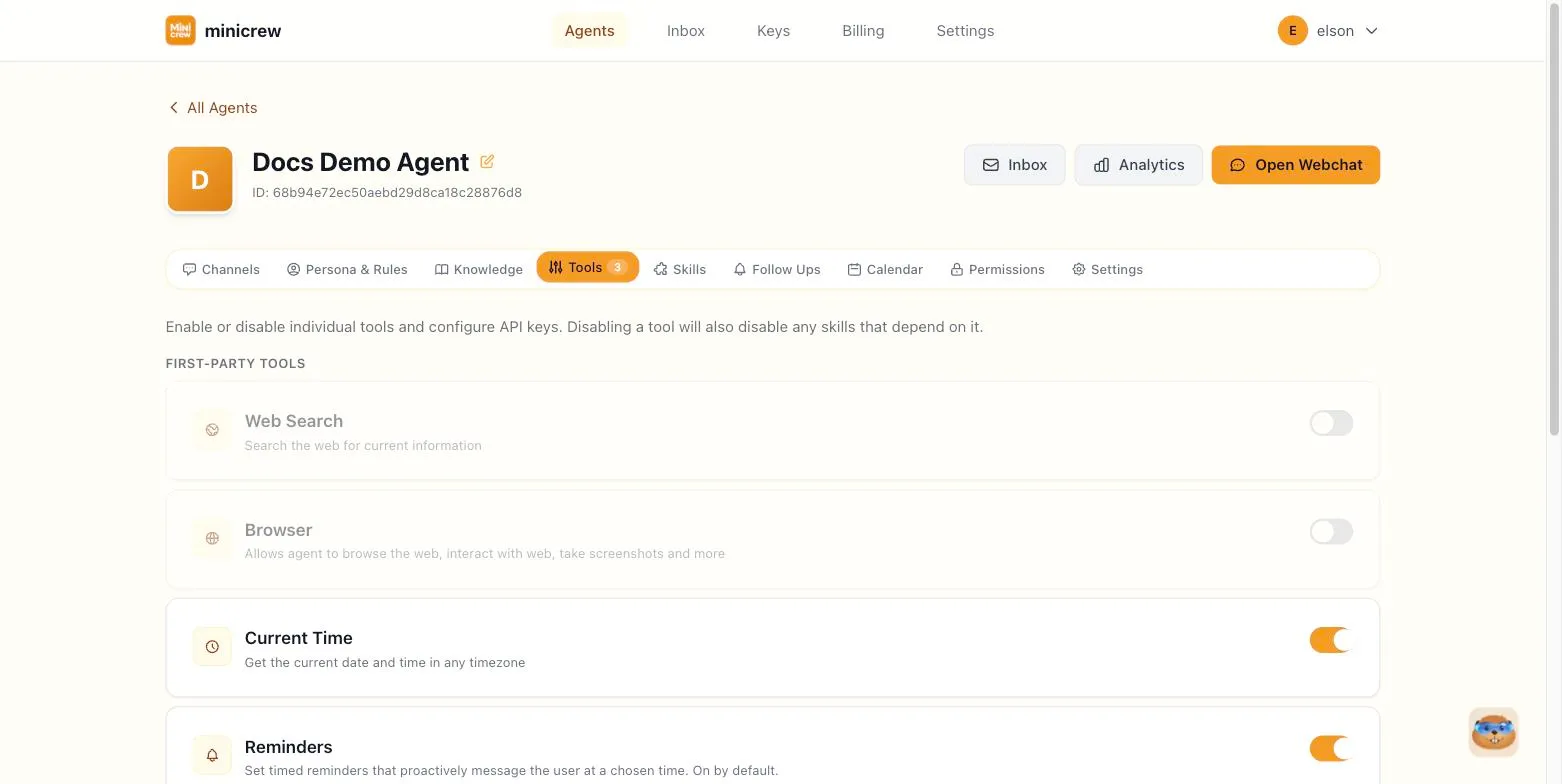
The Tools tab controls individual capabilities your agent can use, separately from the Skills that bundle them together. Tools are grouped into First-party tools, built directly into Minicrew, and Third-party tools (via MCP), brought in through your connected services.
Default-on vs. opt-in
Section titled “Default-on vs. opt-in”New agents start with a tight set of defaults:
Current Time and API Request (remote_fetch) are on by default for every new agent. Reminders is also on by default, but works as an opt-out: it stays on for existing agents unless you explicitly turn it off. Everything else, including web search, browsing, code execution, routines, and any third-party/MCP tools, is opt-in — toggle it on here to enable it.
Each tool card shows a short description. If it’s used by any of your enabled skills, you’ll also see a badge like “2 skills”; hover it to see which ones.
The tools you’ll typically see
Section titled “The tools you’ll typically see”- Web Search — lets the agent search the web for current information.
- Browser — a general web-browsing capability (fetching pages, taking screenshots, reading content). This absorbed several older, more granular browsing tools into one toggle.
- Current Time — gives the agent an awareness of the current date/time.
- API Request — lets the agent make outbound HTTP requests.
- Code Execution — runs code in a sandbox to do calculations, data processing, or generate files.
- Reminders — lets the agent set and track its own reminders.
- Routines — lets the agent run on a recurring schedule (opt-in).
Some tools need a linked key to work. You’ll see a “Needs a key” note with a link to add one, or a Pick a key button right on the tool’s row once it’s enabled.
Browser engine
Section titled “Browser engine”When you enable Browser, a second line appears letting you choose the Engine: the platform Default, or Browserbase, your own Browserbase account, if you’ve linked a key for it (pick or add one right there).
Code Execution model
Section titled “Code Execution model”When Code Execution is enabled and you’ve linked an Anthropic key to it, a Model dropdown appears letting you pick which Claude model runs the agent’s code — otherwise it uses the platform default. A refresh button re-fetches the live model list from Anthropic using your linked key; if the key is invalid you’ll see an actionable error with options to change or remove it.
Which tools actually earn their keep
Section titled “Which tools actually earn their keep”A business support agent gets the most from Web Search and Browser, both help answer questions about things outside your own data, plus Code Execution if it needs to crunch numbers or generate a report on demand. Reminders and Routines matter more for a personal or internal assistant: nudging you about a follow-up, running a daily check-in on a schedule, work that’s about the agent managing itself rather than serving a customer. There’s no wrong combination; turn on what the agent’s actual conversations need and leave the rest off, since every enabled tool is one more thing that can misfire.
Disabling a tool a skill depends on
Section titled “Disabling a tool a skill depends on”If you try to turn off a tool that one or more of your enabled skills relies on, Minicrew warns you first and lists which skills would be affected. Confirming the disable also disables those dependent skills; it won’t silently leave a broken skill enabled with no way to run.